

It is Tuesday morning, and your AI is asking you for the client welcome packet. You finished that packet yesterday. You read it, approved it and closed the laptop feeling ahead for once.
So you make it again, because that is faster than arguing. By Thursday it has happened three times, and you are starting to wonder why you built the thing at all.
The short answer
- Your AI agents redo finished work when two of them were given the same job and neither can see what the other did.
- It looks like forgetting. The real cause is one job with two owners.
- The fix is one step: one agent owns one job.
- Give each agent a job description of three lines: who it is, the one job it owns, and what it never does.
- This is for any owner who already has an AI agent, whether it lives in Cowork, Claude Code, Codex or a chat.
In this post
Why do your AI agents keep redoing work you already finished?
Because two of them were given the same job, and neither one can see what the other did. One agent finishes the work. The second, holding the same job, never saw it and asks you for it again.
It looks like forgetting, so you treat it like forgetting. You repeat the instructions. You rewrite them. You do the work a second time and tell yourself it will hold.
I spent days in that loop. Every morning I sat down to a request for something I had finished the night before, and every evening I believed I had fixed it. It felt like Groundhog Day, and I started asking myself whether having agents was even worth it.
The cost is larger than the hour you spend redoing the work. It is the evening you gave up, the sixth version of a document that was fine at version one, and the quiet doubt about anything your AI tells you is done. A business that runs on doubt does not feel like a business. It feels like a second job.
None of that means you built it wrong. You did the hard part. You built it. Plenty of people will teach you how to build an AI agent, and very few will tell you what happens after it is built.
This happens with one agent and a few chats, too. If a chat drafts your client emails on Monday and your agent drafts them on Wednesday, one job has two owners.
The guides written for programmers say the same thing in their own language. One of them opens with the line “Duplicate work often starts before an agent runs.”1 The mix-up is in how the jobs were handed out, long before anyone pressed start.
How can you tell that two agents share a job?
The clearest sign is finished work that comes back to you. Watch for these four in a normal week:
- You are told something was never done, and you know it was.
- A second version of a document shows up that nobody asked for.
- One agent reports on work that belongs to another.
- You are asked a question you already settled.
The third sign is the easiest to miss. Think of a job you have had where someone with their own responsibilities kept looking over your assignment and reporting on it. They had a job of their own. They were just never on it. Agents do the same thing when their work overlaps.
It happened on my own team. One of my agents, Harriet, ran my community group. I had also handed her outreach and finding leads. That was not her fault. That was mine. I took the leads off her list and gave them to one owner.
Should each AI agent have one job?
Yes. One agent owns one job, and that job leaves out any task another agent was already assigned.
It is the rule that makes any staff work. You would never hire two people for one seat and tell neither about the other. I was a case manager for 14 years, and when a new program arrived with no handbook, I wrote the handbook. What that taught me is simple. In a system that works, everybody knows whose job is whose.
People who build agents for a living land in the same place. Chris Lema writes that each agent should have one job, and that most builders hand them four.2
So before you add another agent or another page of instructions, read what the ones you have were told to do. Your business already does this for people. A standard operating procedure names one owner for every step, and your agents need the same courtesy.
What goes in a job description for an AI agent?
Three lines: who it is, the one job it owns, and what it never does. Write it the way you would for a person joining your team.
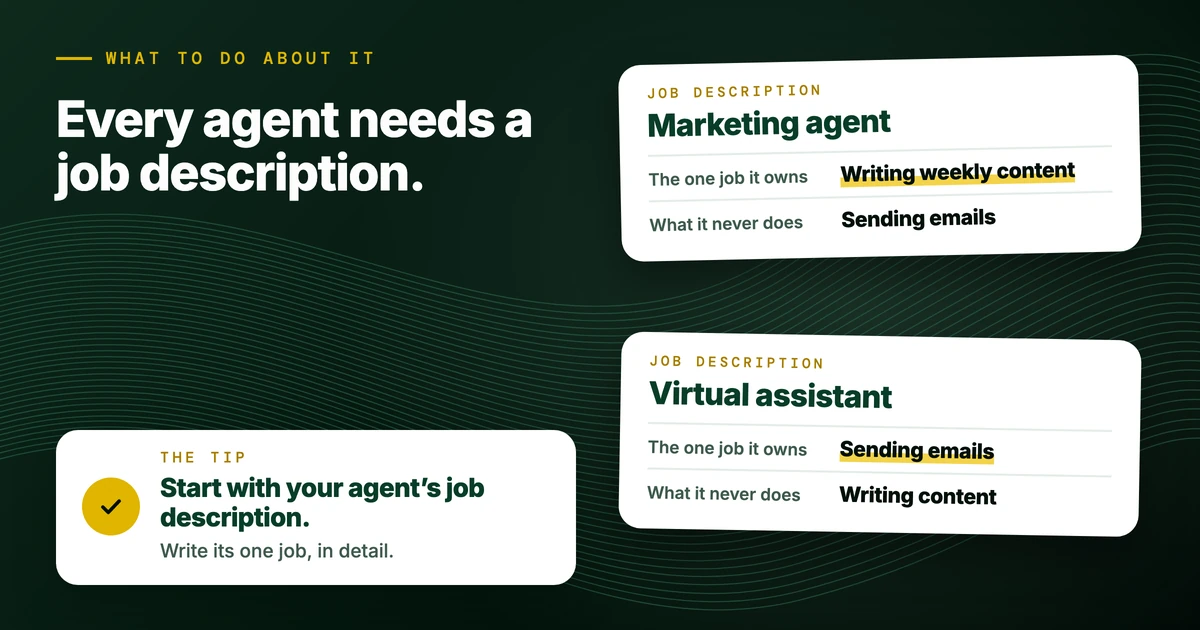
The third line does the most work. “Never sends emails” is what stops the marketing agent from reaching into the assistant’s job on a busy day.
You do not need technical words for any of this. If you can describe how your business runs, you can write a job description. The step-by-step version, with a prompt you can copy, is in this week’s North Star Newsletter.
Who keeps every agent on its own job?
One owner of the whole list. On a team of agents, that can be a chief of staff. If you work alone, it is you, for a few minutes each week.
Mine is an agent named Olivia Pope. On her first day she told me I had too many agents assigned to the same job. Now every agent on my team has one job, and she checks that each one stays on it.
Some of that checking can run without you. Deciding who owns what cannot.
| Can be prepared automatically | Needs a person |
|---|---|
| Listing every AI helper and what it was asked to do | Confirming the list matches how you really work |
| Pointing out a job that two helpers share | Choosing which one keeps it |
| Flagging a job that nobody owns | Deciding whether it goes to a tool, to you or to a team member |
| Drafting a job description for each helper | Approving every line before anything changes |
The last row matters most. Microsoft’s guidance for organizations that run agents says actions with significant business consequences may need human approval.3 On every system I build, a person approves anything that leaves the business.4 The same line decides which client messages need approval before they go out.
What changes when every job has one owner?
You start to trust it. You hand over a task, it gets done the same way each time, and you move to the next thing on your list.
By my own estimate, my team of agents does about 47 hours of work a week that I would otherwise do by hand. What came back to me was time to go find leads and time with my family. I am no longer anxious about getting back to my computer to see whether it did what I asked.
One agent, one job is one rule out of the five I run my team by. It is the quickest to set up, which makes it the right place to begin. The other four cover how much you hand an agent at once, how clear each instruction is, the one handbook it reads, and what happens to old instructions after a change.
Start with the piece of work that came back to you most recently. Which job in your business has two owners right now?
Sources
- Digital Applied Team, "How to Stop Two AI Agents from Doing the Same Job Twice," Digital Applied, October 11, 2026. Read November 15, 2026.
- Chris Lema, "Your AI agents have one job each. Most builders give them four," April 22, 2026. Read November 15, 2026.
- Microsoft, "Operational standards for AI agents," Cloud Adoption Framework, Microsoft Learn, November 9, 2026. Read November 15, 2026.
- North Star Operations, khudco.com/operations. Read November 15, 2026.
The people in the cover picture are AI-generated illustrations.

Written by Kalilah Hudson
Kalilah spent fourteen years writing procedures and training the departments that ran them. She now builds the systems service businesses run on through North Star Operations.
Every Monday she sends one part of your sales and client system in The North Star Newsletter. Get the weekly guide.